Folder structure for measures

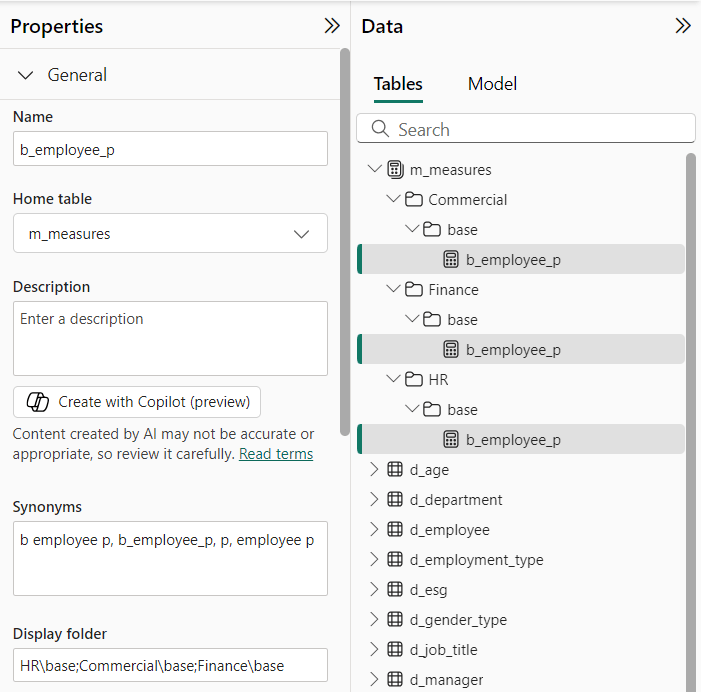
In the model view, you can ‘display folder’ your measure and with back slash (/) you can even create subfolders.

But did you know that if you use a semicolon (;) between folder structures, you can show that measure in multiple folders. Without duplicating the measure. This is very useful if you have one (1) measure that is used in, for example, multiple reports. You can then create a folder structure for a measure per report. This will help you keep track of where your measure in being used.
Sharing is caring!

Twitter
LinkedIn
WhatsApp
Email
Threads

Have a look at my other blogs

ISFILTERED

You probably know that the ISFILTERED function returns TRUE when the specified table or column is being filtered directly. But did you know that if you add multiple ISFILTEREDs together, ISFILTERED will not return true or false, but will return a number. You can combine this returned number with a switch function to influence your total levels.

Read More ...

Un-Bold Row Headers

Have you ever created a matrix visual, with hierarchy, where your row headers are formatted 𝐛𝐨𝐥𝐝? You can not seem to turn if off, because

Read More ...

Discover more from BI Inside

Subscribe now to keep reading and get access to the full archive.

Continue reading